

The Search URL
Bright Data uses advanced parsing and access logic to provide you reliable response of search results, as fast as possible. We require that your search prefix will not carry any arguments in the URL before theq= argument. Relaying arguments before the q argument may result in delays in response and lower success rate.
Example for correct URL with the gl argument appended for search results in the US:
gl argument preceding q argument.
How to search for a term comprised of multiple words?
When you issue the query, add a+ character in between the words in your search term. So if you want to search for “pizza in paris” the search string should be: pizza+in+paris
Web search
Query parameters
Localization
Localization
Google now serves all search results exclusively through
google.com and as such, any SERP API request sent to a different Google TLD (e.g., google.co.uk, google.ca) will automatically be routed through google.com.Localization is no longer determined by the TLD and should instead be configured solely using the gl (country) and hl (language) query parameters below:gl
Two-letter country code used to define the country of searchgl
hl
Two-letter language code used to define the page languageshl
Search type
Search type
tbm
Define search type. For regular search there is no need to use the tbm parameter while other types have a unique tbm value.Example:
tbm=nws- newstbm=vid- videostbm=lcl- Google Places (local search results)
For Image search, see the Images section.
udm
Example:
udm=1- Google Places (local search results)udm=28- shoppingudm=39- short videos
ibp
Use the ibp parameter for Jobs search type.Example:
ibp=htl;jobs- Jobs
safe
Use the safe flag with values active or off to enable or disable safe search.Example:
safe=active- Safe search is ONsafe=off- Safe search is off
Time filtering
Time filtering
Pagination
Pagination
Geo-Location
Geo-Location
uule
Stands for the encoded location you want to use for your search and will be used to change geo-location. A CSV with all available uule values can be downloaded here.The value of column “Canonical Name” from the CSV can be used as a raw string to the APIExample:
&uule=New+York,New+York,United+States
Using geographic coordinates for location BETA
You can provide a set oflatitude , longitude and radius as uule parameters, and Bright Data will compose the closest possible uule encoded location for you.The format is uule=lat,lon,radiusExample - searching pizza with Eiffel Tower coordinates:
Lat=48.8584,lon=2.2945andradius=200:
Device
Device
brd_mobile
Define what device type to be represented in user-agent. Default or
brd_mobile=0 will provide random desktop user-agent while brd_mobile=1 will provide random mobile user-agent.For specific mobile platform provide one of the following values:brd_mobile=ios- iPhone user-agent (aliasbrd_mobile=iphone)brd_mobile=ipad- iPad user-agent (aliasbrd_mobile=ios_tablet)brd_mobile=android- Android phonebrd_mobile=android_tablet- Android tablet
Browser
Browser
brd_browser
Define what browser to be represented in user-agent. Can be combined with
brd_mobile to get according mobile browser. Default will provide random browser.
For specific browser provide one of the following values:brd_browser=chrome- Google Chromebrd_browser=safari- Safaribrd_browser=firefox- Mozilla Firefox (not compatible withbrd_mobile=1)
Hotel search
Hotel search
hotel_occupancy
Number of guests to book a room for (up to 4).See
brd_occupancy parameter of Hotels which provides more flexibility.Examples:
hotel_occupancy=1- for 1 guesthotel_occupancy=2(default) - for 2 guests
hotel_dates
Check-in date and check-out date, separated by comma.Format:
YYYY-MM-DD,YYYY-MM-DDExamples:
hotel_dates=2022-05-01,2022-05-03- find rooms available from 1st until 3rd of May, 2022
AI Overview
AI Overview
brd_ai_overview
Setting brd_ai_overview=2 will increase the likelihood of receiving Google’s Generative AI Overviews in your SERP responses, typically appearing in ~15-20%+ of results.- Expect an extra ~5-10 seconds of latency in SERP API’s response time with this query parameter, as it launches a browser to capture the entire AI Overview content.
- To better trigger an AI Overview, your SERP keywords must be relevant to topics that Google considers suitable for generative responses.
Parsed AI Overviews Example
Headers
For the full list of SERP API request headers (session pinning, output format, rate-limit info), see SERP API features. The most useful header for Google Web search isx-unblock-data-format: parsed_light, which returns a parsed JSON limited to the top 10 organic results with approximately 50% lower latency than full JSON parsing.
Maps
Query parameters
Localization
Localization
Coordinates
Coordinates
Pagination [Deprecated]
Pagination [Deprecated]
To get all google maps information use our Scrapers. Our scrapers library includes a google maps scraper which covers the full data retrieved from a google maps search. Direct scraper link (requires login to Bright Data) Google Maps Scraper API.
Define the result offset - results to start from the selected value. Used for managing pagination.
start [deprecated]
Define the result offset - results to start from the selected value. Used for managing pagination.Examples:
start=0(default) - first page of resultsstart=10- second page of resultsstart=20- third page of results, etc.
Maps place overview
Maps place overview
fid
Get the results of a Google Maps Place by fid.Use GET request on http://www.google.com/maps/place/data=!3m1!4b1!4m2!3m1!1s with the fid value at the end.Sorting and filtering
Sorting and filtering
Headers
For the full list of SERP API request headers, see SERP API features. For Google Maps, setx-unblock-data-format: parsed_light to receive parsed JSON results with reduced latency:
Trends
Required Parametersbrd_json=1: Returns parsed JSON results (Trends supports parsed results only).brd_trends=timeseries,geo_map: Retrieves widget data with best success rates.
Query parameters
Widgets
Widgets
Geo
Geo
Localization
Localization
Time range
Time range
date
Time range to search.Available values are:now 1-H- Past hournow 4-H- Past 4 hoursnow 1-d- Past daynow 7-d- Past 7 daystoday 1-m- Past 30 daystoday 3-m- Past 90 daystoday 12-m(default) - Past 12 monthstoday 5-y- Past 5 years2020-07-01 2020-12-31- custom date range
Category
Category
Search type
Search type
gprop
Google property to filter on. Defaults to web search.Possible values are:
images, news, froogle (for Google Shopping), youtubeHeaders
For the full list of SERP API request headers, see SERP API features. Google Trends responses are always parsed JSON whenbrd_json=1 is set, so the x-unblock-data-format header is not needed for this endpoint. Use x-brd-session: <session-id> to pin requests to the same peer when running consecutive Trends queries.
Reviews
Query parameters
Feature id
Feature id
fid
Feature id what you want to fetch reviews to. fid parameter can be found in knowledge.fid field of google search response.For example:
https://www.google.com/search?q=hilton%20new%20york%20midtown
Localization
Localization
Sorting and filtering
Sorting and filtering
sort
The way reviews are sorted.Possible values are:sort=qualityScore(default) - most relevant firstsort=newestFirst- newest firstsort=ratingHigh- highest rating firstsort=ratingLow- lowest rating first
filter
Filter keyword. Will respond with reviews that contain specified keyword only.For Example:
filter=awesome- search for reviews containing ‘awesome’ word
Pagination
Pagination
Sample Response
Sample Response
Headers
For the full list of SERP API request headers, see SERP API features. For Google Reviews, setx-unblock-data-format: parsed_light to receive parsed JSON results. Combine with x-brd-session: <session-id> to pin paginated review fetches (start) to the same peer.
Images
Google image search usesudm=2 (replaces deprecated tbm=isch since March 2026). Below are the parameters specific to image search.
Query parameters
Localization
Localization
Search type
Search type
udm
Use udm=2 to enter Google Image search.safe
You can control the images’ search with 3 modes:off- This will display all images, even inapproproate ones.onoractive- This mode will filter out from the results in appropriate results.images- This mode will show a blurred version of the inappropriate images.
safe=[mode] to get the required results.This is examples for blured images filter.
We cannot publish inappropriate search terms in our documentation - so our default search term here will remain pizza . To see the actual impact, you need to modify the search term.
tbm [deprecated]
Image size
Image size
tbs
Usage: tbs=isz:[l|m|i] to set preferred image size filter (large, medium, small).tbs=li:1 is rejected on image search as well as web search. See tbs under Web search.Headers
For the full list of SERP API request headers, see SERP API features. For Google Image search, setx-unblock-data-format: parsed_light to receive parsed JSON results:
Lens
Query parameters
Image URL
Image URL
Localization
Localization
Upload image as file
Upload image as file
Get exact matches
Get exact matches
brd_lens
The brd_lens parameter in your request fetches specific Google Lens tab results by specifying a tab value (e.g. products, homework, visual_matches, exact_matches). 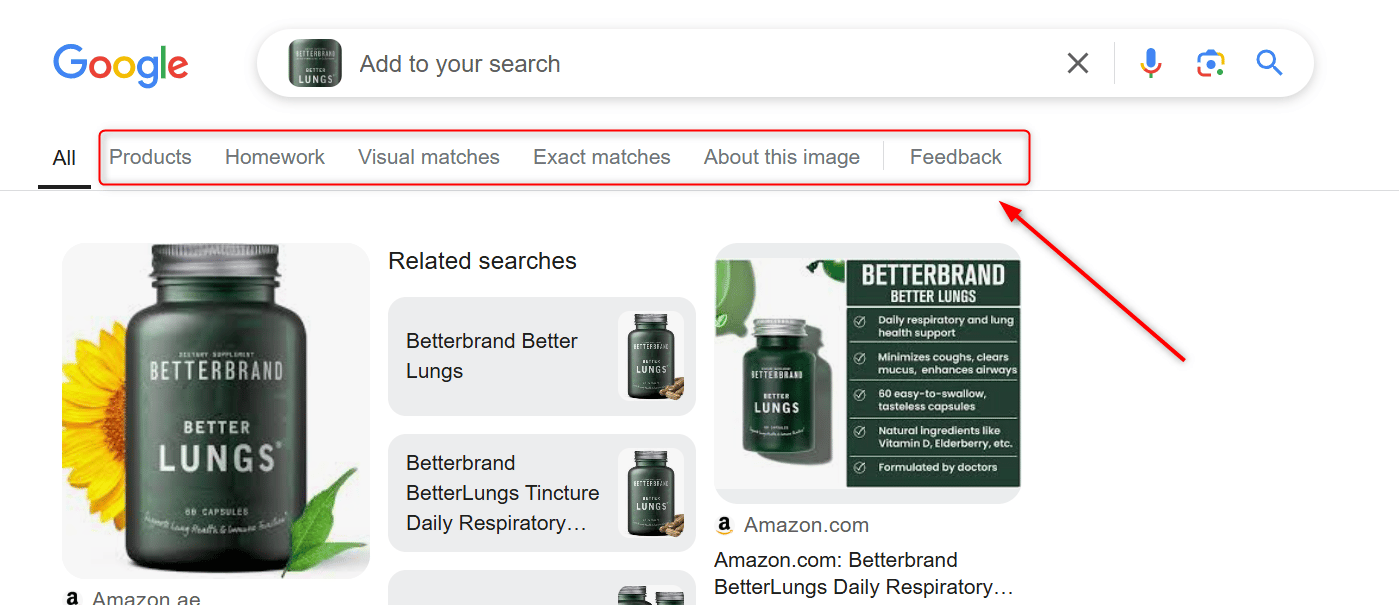
Headers
For the full list of SERP API request headers, see SERP API features. For Google Lens, setx-unblock-data-format: parsed_light to receive parsed JSON results. When uploading an image as a file (POST to /v3/upload), x-brd-session: <session-id> is required to keep the upload and result fetch on the same peer.
Hotels
Query parameters
Localization
Localization
Booking dates and options
Booking dates and options
brd_dates
Check-in date and check-out date, separated by comma.Format:
YYYY-MM-DD,YYYY-MM-DDExample:
2022-01-20,2022-02-05
brd_occupancy
Number of guests to book a room for (maximum 6 guests).Also supports a comma-separated list of integers where:Examples:
brd_occupancy=1- look for a room for 1 personbrd_occupancy=2(default) - for 2 personsbrd_occupancy=3- for 3 persons, etc.
- first value is a number of adult guests
- subsequent values are ages of children
Format:
brd_occupancy=<number of adults>,<child 1 age>,<child 2 age>,...,<child N age>Examples:
brd_occupancy=1,5,7,12- for 1 adult and 3 children (5, 7 and 12 years old)brd_occupancy=2,1,3- for 2 adults and 2 children (1 and 3 years old)
brd_free_cancellation
Show only offers with free cancellation.Examples:
brd_free_cancellation=true- with free cancellationbrd_free_cancellation=false(default) - show any offers
brd_accommodation_type
Accommodation type: Hotels or Vacation Rentals.Examples:
brd_accommodation_type=hotels(default) - search for Hotelsbrd_accommodation_type=vacation_rentals- search for Vacation Rentals
brd_currency
Currency to show prices at (3-letter code).Examples:
brd_currency=USD- United States Dollarsbrd_currency=EUR- Eurobrd_currency=INR- Indian Rupees
Output format
Output format
brd_mobile
Define what device type to be represented in user-agentDefault or brd_mobile=0 will provide random desktop user-agent while brd_mobile=1 will provide random mobile user-agent.For specific mobile platform provide one of the following values:brd_mobile=ios- iPhone user-agent (aliasbrd_mobile=iphone)brd_mobile=ipad- iPad user-agent (aliasbrd_mobile=ios_tablet)brd_mobile=android- Android phonebrd_mobile=android_tablet- Android tablet
brd_json
Bright Data custom parameter allowing to return parsed JSON instead of raw HTMLExamples:
brd_json=1- return results in JSONbrd_json=html- return JSON with “html” field containing raw HTML
Headers
For the full list of SERP API request headers, see SERP API features. For Google Hotels, setx-unblock-data-format: parsed_light to receive parsed JSON results. Combine with x-brd-session: <session-id> to keep brd_dates and brd_occupancy queries pinned to a stable peer.