

Building an AI startup?
You might be eligible for our Startup Program. Get fully funded access to the infrastructure you’re reading about right now (up to $20K value).
This cookbook walks you through building a complete lead intelligence pipeline - from scraping to RAG-powered Q&A.
What You’ll Build
An AI sales research assistant that:- Finds companies matching your Ideal Customer Profile (ICP) criteria
- Identifies decision makers and researches their backgrounds
- Extracts pain points from job postings, news articles, and company data
- Generates personalized outreach angles based on comprehensive company intelligence
- Bright Data: Web scraping for 45+ data sources (LinkedIn, Crunchbase, news, job boards)
- MongoDB Atlas: Vector database for semantic search + structured metadata filtering
- Haystack: Open-source LLM framework for building RAG pipelines
- Google Gemini 2.5: Generate actionable sales intelligence from raw data
How the architecture works
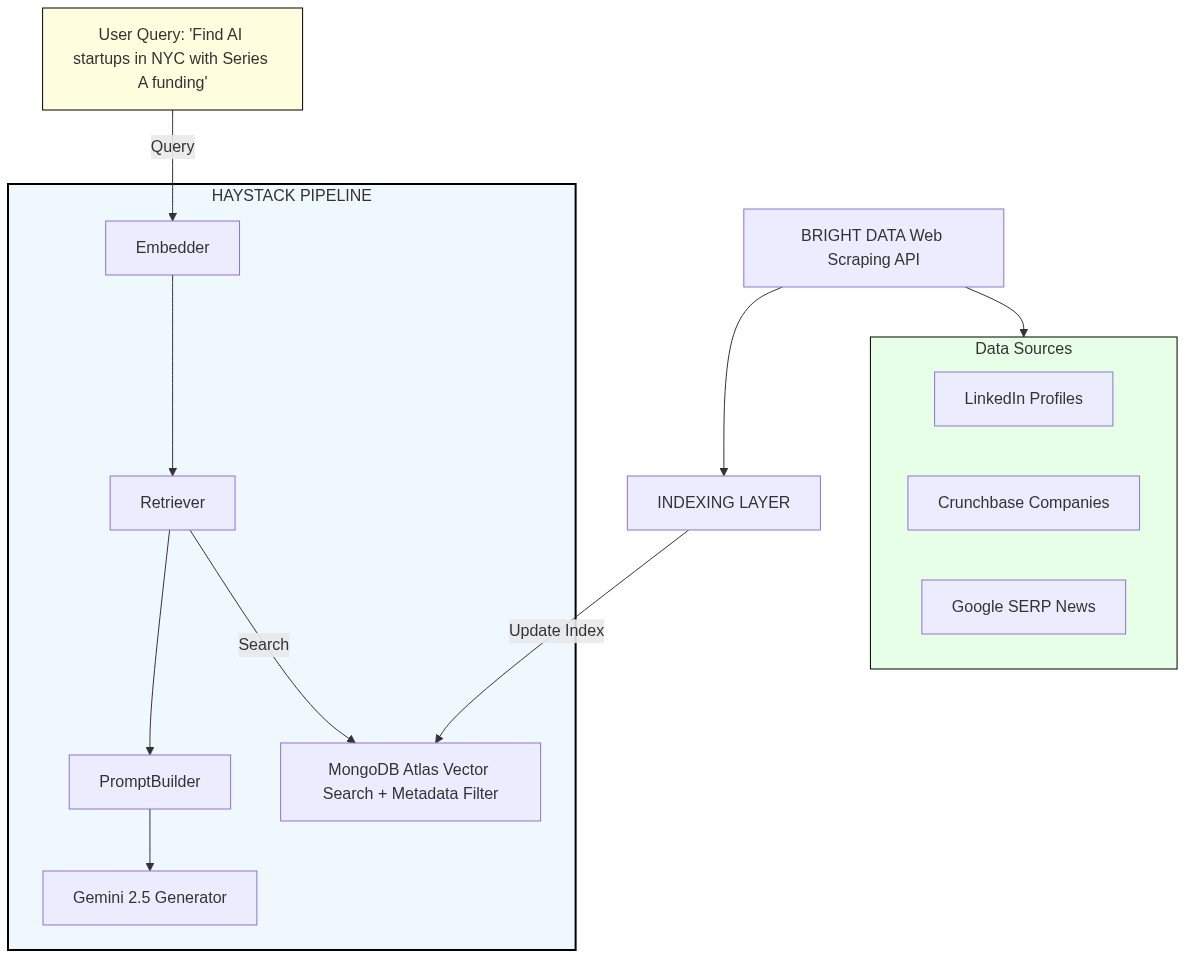
How each component fits in
1. Bright Data Layer (Data Collection)- Scrapers: Extracts structured data from 45+ sources
linkedin_company_profile: Company size, industry, description, locationlinkedin_person_profile: Decision maker titles, backgrounds, experiencecrunchbase_company: Funding rounds, investors, employee count
- SERP API: Real-time search results from Google/Bing
- Company news and press releases
- Job postings (signal for pain points)
- Industry trends and mentions
- Vector Search: Semantic similarity matching on embedded company/person descriptions
- Metadata Filtering: Hybrid search combining vectors with structured filters (industry, funding stage, location, company size, job titles)
- Document Storage: Stores raw scraped data + embeddings + metadata
- Embedder: Converts queries and documents to vector representations using Google’s text-embedding-004
- Retriever: Finds most relevant leads from MongoDB based on semantic + metadata match
- Prompt Builder: Constructs context-rich prompts with retrieved lead data
- LLM Generator: Gemini 2.5 Flash synthesizes insights and generates actionable intelligence
Prerequisites
- A Bright Data account with API key from the dashboard
- A MongoDB Atlas cluster (M0 free tier is sufficient for testing)
- A Google API Key for Gemini access
- Python 3.10+
Step 1: Install Dependencies
Step 2: Set Environment Variables
Get your API keys:- Bright Data API Key - Generate from your dashboard
- MongoDB Connection String - From your Atlas cluster
- Google API Key - For Gemini access
Bright Data Datasets Reference
Step 3: Initialize Components
List Available Datasets
MongoDB Atlas Setup
MongoDB Atlas serves as the vector database for storing embedded lead data and enabling semantic search. 1. Create a MongoDB Atlas Cluster Follow the Get Started with Atlas guide to:- Create a free cluster (M0 tier is sufficient for testing)
- Set up database access credentials
- Configure network access (allow your IP or use 0.0.0.0/0 for testing)
- Get your connection string
- Go to your cluster in the Atlas UI
- Click the “Search” tab → “Create Search Index”
- Select “Atlas Vector Search” → “JSON Editor”
-
Configure:
- Index name:
lead_vector_index - Database:
sales_intelligence - Collection:
leads
- Index name:
- Paste this configuration:
- Wait for the index status to change from “Building” to “Active”
Initialize the Document Store
Initialize the Retriever and Scraper
Step 4: Scrape Data from Multiple Sources
Example 1: Scraping Crunchbase Company Data
Extract company intelligence from Crunchbase - funding information, investors, employee count, and more.Example 2: Scraping LinkedIn Company Data
Extract broader company information from LinkedIn.Example 3: Scraping LinkedIn Person Profile
Extract decision maker profiles from LinkedIn - key contacts, their backgrounds, and experience.Step 5: SERP API for Market Signals
Bright Data’s SERP API lets you gather market signals through search results - hiring signals, news, and pain points.Example SERP Queries for Sales Research
Search for Company News
Step 6: Data Processing & Indexing Pipeline
Process and index scraped data into MongoDB Atlas for semantic search.Helper Functions: Transform Scraped Data into Haystack Documents
Build the Indexing Pipeline
Create a Haystack pipeline that automatically generates embeddings and writes to MongoDB Atlas.Index Sample Companies
Test the complete indexing flow by scraping a company and indexing it into MongoDB Atlas.Step 7: RAG Pipeline for Sales Intelligence
RAG combines retrieval (finding relevant documents) with generation (LLM synthesis) to answer questions based on your indexed data.Which components to use
Build the RAG Pipeline
Step 8: Query the Sales Research Assistant
Data Model Design
The lead intelligence database uses a flexible schema that accommodates data from multiple sources while enabling powerful hybrid search capabilities. This structure enables three search modes:-
Semantic Search: Find similar companies/people based on meaning
- Query: “AI startups focused on enterprise automation”
- Matches: Companies with similar descriptions, even if wording differs
-
Metadata Filtering: Exact match on structured fields
- Filter:
funding_stage = "Series A" AND location = "New York, NY" - Returns: Only companies meeting exact criteria
- Filter:
-
Hybrid Search: Combine both approaches
- Semantic query: “Companies building developer tools”
-
- Filters:
funding_stage = "Series A"ANDlocation = "San Francisco, CA"
- Filters:
- Result: Semantically relevant companies that also match exact criteria
Example Documents
Each document has three components:content (human-readable text for LLM context), embedding (768-dim vector from text-embedding-004 for semantic search), and meta (structured fields for filtering).
Company Document (Crunchbase):
Next Steps
LinkedIn Scraping
Add LinkedIn profile enrichment
Haystack Integration
Full haystack-brightdata documentation
SERP API
Explore the full SERP API reference
Scrapers
Browse all 45+ supported datasets
You now have an AI-powered sales research assistant! Customize the pipeline to scrape additional data sources, add more metadata filters, or adjust the RAG prompts for your specific sales workflow.