

Async is supported by both Web Unlocker API and SERP API products
Async VS Sync requests
There are 2 ways for us to handle your Web Unlocker API and SERP API requests:defaultSynchronous requests - Send a request and get a real-time response immediately- Asynchronous requests - Send a request (without waiting for an immediate response) and retrieve the results later via our designated API endpoint. Callback times are usually up to 5 minutes but may take up to 8 hours during peak periods. Responses are stored for up to 48 hours from the time the request was sent.
Why should I use Async?
- 99.99% success rate
- Stability
- Flexibility - the ability to retrieve your requests at a later time of your choosing (and not have to wait for the response immediately after sending the request)
How it works
Sending requests and receiving responses with Async mode is a two-step flow:- Sending the request - This request includes the search parameters, returns a
response_ID, and is a direct request (i.e. you will be billed for this request). - Collecting the response - This request includes the
response_IDand is free of charge (i.e. you will not be billed for this request). If you call for aresponse_IDwhich is still being processed you will receive a 202 status code.
We store responses for up to 48 hours from the time the request was sent.
How to get started
1
Enable "Asynchronous requests"
Within your specific Web Unlocker API or SERP API zone, under “Advanced settings”, enable the “Asynchronous requests” toggle. 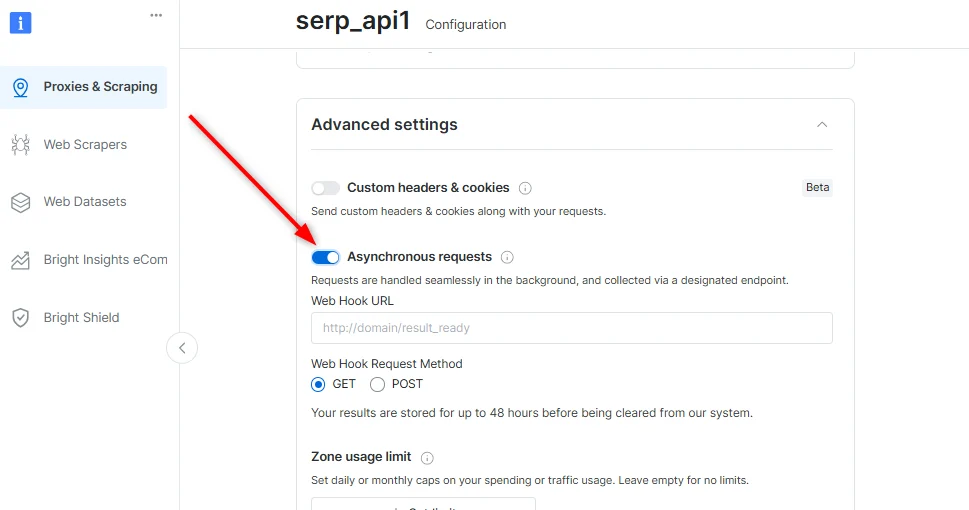
2
[Optional] Setting up a webhook (POST or GET)
This is where you will get notified on the status of your future requests
A webhook can also be set per request (see “Initial request parameters” below)
3
Sending an async request
The request syntax is slightly different from that of synchronous requests and requires an API key for authentication. See a basic example below (for more request parameters see below):You’ll receive a response to the above that contains an
x-response-id header with the ID of your request. This is the RESPONSE_ID for this request which you will use when collecting your results in the next step.You can easily save the
RESPONSE_ID in your script by initializing it along with your request like this:4
Webhook notification
If you’ve set up a webhook, you’ll receive a notification immediately when the requests are ready with the following parameters:
status, response_id, request_url and hook_data (optional - if you’ve used the webhook_data parameter in your request).5
Collecting your results
We recommend to wait 20 seconds prior to the first poling request to get the response, 10 seconds for the second pole and 5 for the rest.Bright Data may apply rate limit for excessive poling requests without response.To get the response, use the
RESPONSE_ID received in step 3, send the following:API - Request creation - POST /{unblocker|serp}/req
Example
Parameters
Which SERP-specific parameters to use
SERP Example
API - Response collection - GET /{unblocker|serp}/get_result
Note: response_id comes from the x-response-id header of the request creation response
Example